

You now have the ability to update the firmware for your Innuos network switch. This requires a compatible Innuos system running Sense 26.0.2.
Update your WaveNET firmware from Sense
WaveNET is the board inside the Innuos NET3, Next-Gen NET and NazaréNET. You can now keep its firmware up to date without any extra tools: Sense downloads the latest firmware for you and guides you step by step through installing it.
Where to find it: System > Settings > Advanced Settings > Update WaveNET Firmware
How to update
- Open Update WaveNET Firmware. Sense prepares the latest firmware and shows which version will be installed.
- Have the WaveNET’s USB cable ready (but don’t connect it yet) and press Start.
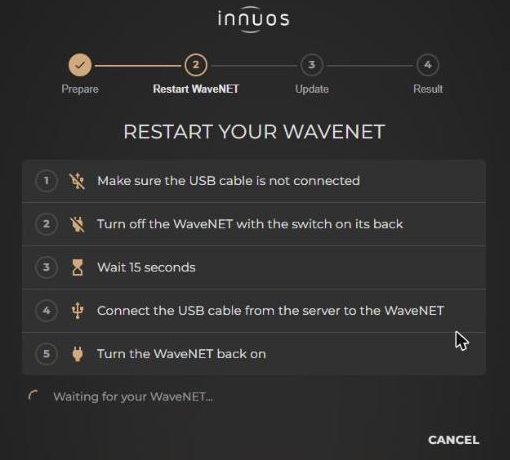
- Follow the on-screen steps: turn off the WaveNET with the switch on its back, wait 15 seconds, connect the USB cable from the server to the WaveNET, and turn it back on.
- Sense detects the WaveNET and installs the firmware on its own, then shows the result.
The update takes about 2 minutes. Update one WaveNET at a time. Your app may briefly lose its connection to the server while the WaveNET restarts: the update carries on, and Sense shows the result once the connection is back. If the server can’t be reached for too long, Sense tells you what to check.