

With the launch of Sense 3.3 we’ve introcuded another key way in making it easier to get your music playing with the introduction of Presets.
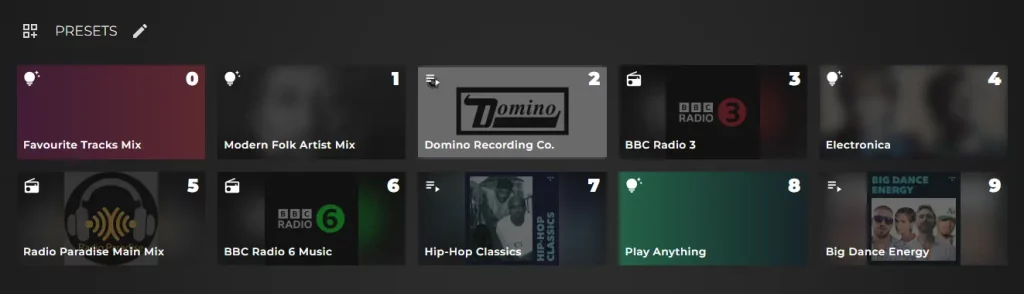
This is a new widget available on the Home tab of Sense with 10 preset slots numbered 0 through 9.
To these presets you can assign:
- Playlists
- Radio Stations
- Smart Mixes
You can identify what type of music is assigned to the preset number by the corresponding icon it’s labelled with, so for example the radio icon to denote a radio preset and so on. You will know when a music source can be added to a preset by this new ‘Add to preset’ icon as seen here, highlighted in the red circle:
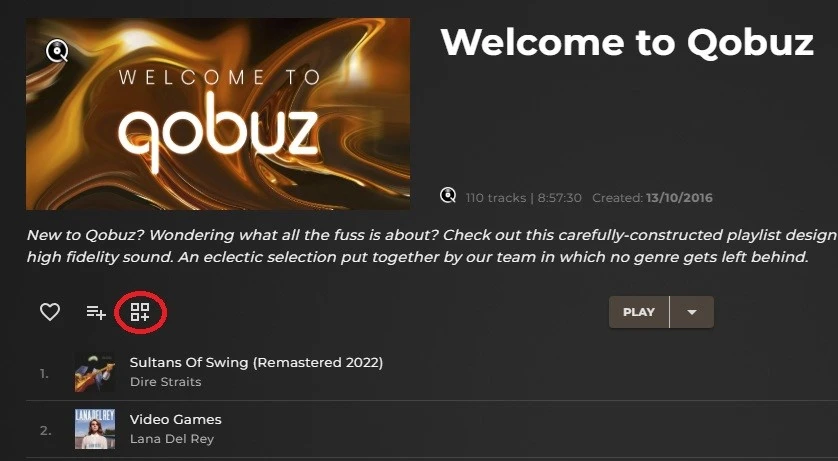
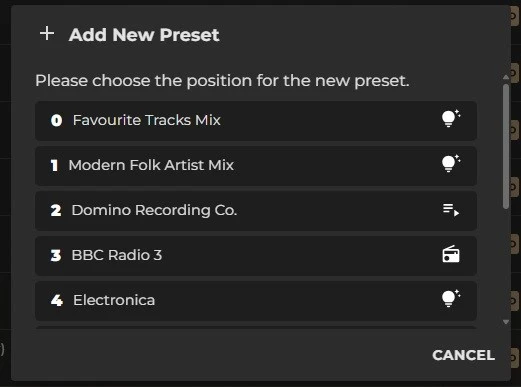
Pressing this icon will bring you to the menu from where you can choose which number you would like to assign this preset to:
The preset widget itself can be edited on the homescreen, allowing you the option to change the order of which music source is assigned to which number, or to just delete/clear/empty one of the preset slots altogether.
Additional STREAM Series functionality
Why are the presets numbered 0-9? Because with the new STREAM series that will support control with IR remotes, you can now simply use that remote to turn the Stream on, then press a numbered button to begin playing music that you assigned to that number.
Are you a big fan of BBC Radio 3? Then you can assign that to preset 3 for easy memory and just get that station playing through the single press of one button.
This does also create a possibility where if your network router were to fail completely (meaning no WiFi or local network at all), as long as you had a preset with a smart mix or playlist containing local files then you could still play this music just from using the IR remote.
Adding a Preset
Here is a short clip of the preset creation process: